When it comes to aircraft maintenance, accuracy and traceability are everything. The Model Tree feature in SAM (developed by ASA Software) is a powerful tool designed to provide engineers, CAMO teams, and leasing organizations with a clear, dynamic view of aircraft configuration right down to the component level.
Whether you’re maintaining a commercial fleet or preparing an aircraft for lease return, the Model Tree ensures that every part is installed in the right place — and stays there.
What is the Model Tree?
Located within SAM’s Aircraft and Component Sub-Modules, the Model Tree provides a visual hierarchy of an aircraft’s systems and components. Each branch of the tree represents a zone or position where specific parts (identified by Part Number, or PN) must be installed.
For each position, the Model Tree tracks:
· The approved PNs permitted for installation.
· The installed PN and Serial Number (SN) if a part is present.
· A color-coded status light indicating installation status.
Traffic light indicators provide instant visual cues:
· 🟥 Red: No component or an incorrect PN is installed.
· 🟧 Amber: A warning condition exists — investigation needed.
· 🟩 Green: Correct PN is installed.
This system helps ensure component conformity and dramatically reduces the time spent checking part installations manually.
A Closer Look: Engines and Component-Level Traceability
One of the most powerful aspects of the Model Tree is that it isn’t limited to airframes, it can also be applied at the component level. This allows maintenance teams to create detailed configuration trees for major components such as engines, propellers, landing gear, APUs.
Each of these components can have its own Model Tree, including sub-components, attachments and more. This flexibility means that you can build an entire Model Tree for your aircraft, down to the smallest serialized item.
Example 1: Engine Installation in Zone 440 (see image below)

Consider the aircraft OY-ASA, where Zone 440 – Engine requires one of three approved PNs. In the image below, a green status light indicates that a compliant part has been installed. Engineers can also view the PN and SN associated with the engine at a glance.
This not only confirms airworthiness compliance but also simplifies verification during audits or lease transitions.
Example 2: Investigating a Warning in Zone 312

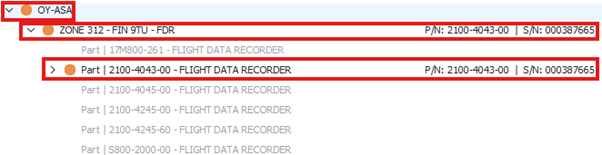
On the same aircraft, Zone 312 – FIN 9TU is showing an amber light, signalling that a closer inspection is necessary.
Expanding the Model Tree reveals another amber light, even though a valid PN has been installed. The issue lies deeper in the component chain.
Further expansion uncovers a red light, clearly showing a problem — a missing component.
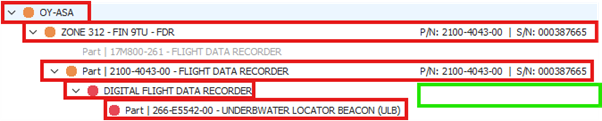
In this case, the Underwater Location Beacon (ULB) is not installed, prompting an immediate corrective action.
Benefits for Airworthiness and Leasing Teams
The Model Tree is particularly valuable to:
· Airworthiness managers, who need real-time confirmation of compliant installations.
· Maintenance planners, who can pinpoint problems before they escalate.
· Leasing companies, who require a transparent overview of component traceability during lease transitions.
· Auditors, who benefit from a digital record of PN and SN conformity.
SAM’s Model Tree reduces the risk of misconfiguration, streamlines troubleshooting, and ensures ongoing compliance with regulatory standards.
Conclusion
SAM’s Model Tree gives engineers and managers the tools they need to stay ahead. Whether they’re troubleshooting an amber light, confirming that the PN correct is installed, or building a complete component tree for the propeller or engine, this feature can play an integral part in increasing productivity and therefore profitability for the company.
Fun Fact: Did you know that the Boeing 747 has over 6 million parts? That’s more than the number of bricks in the Empire State Building! Now imagine trying to track all that manually… Good thing SAM’s Model Tree exists.