Operational
Work execution and release pipeline

 Maintenance
Software module
 Maintenance
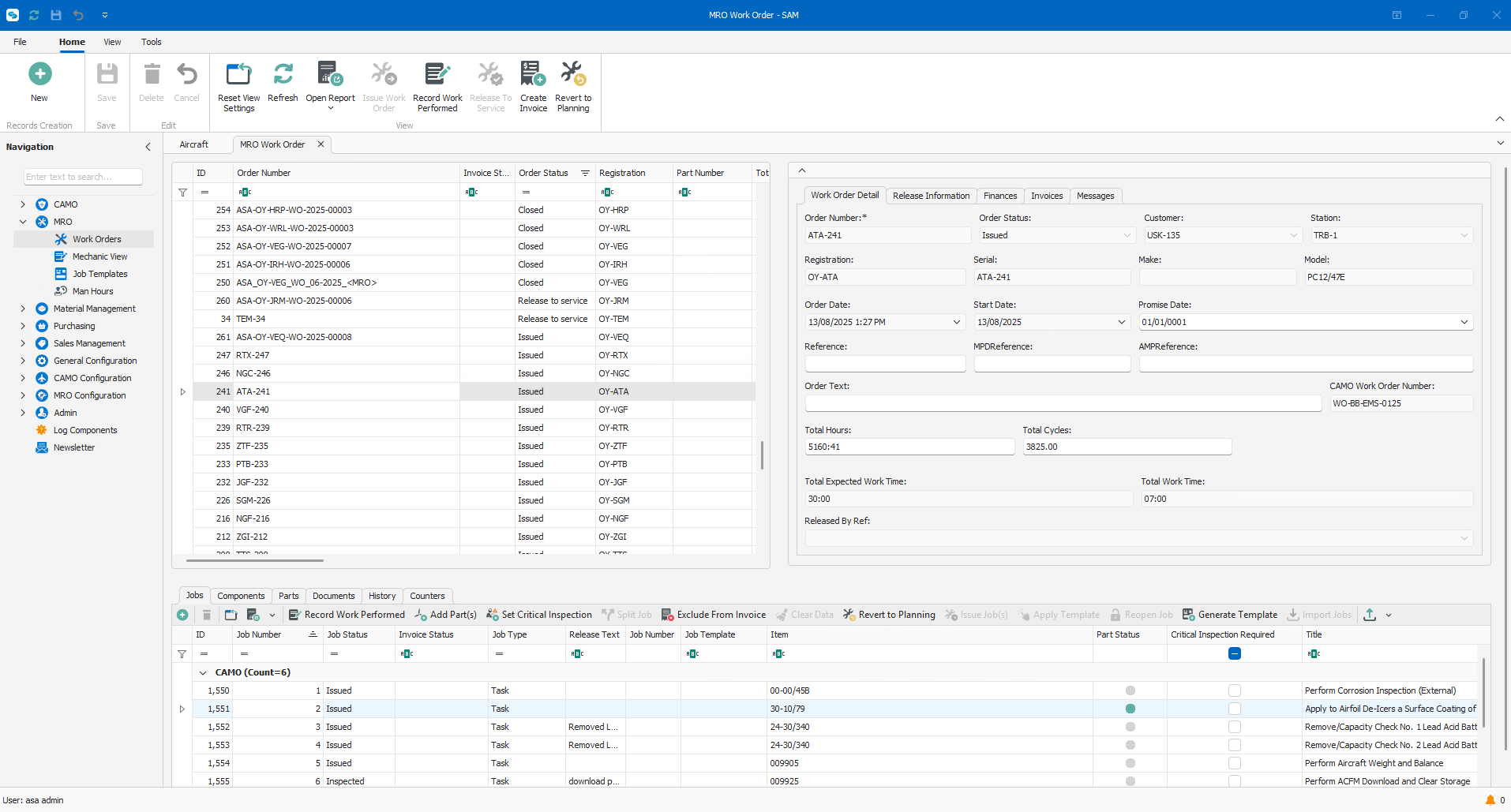
Two kinds of work order, one aircraft record. MRO execution software for Part-CAO and Part-145 organisations, connecting work orders, workpacks, labor, tools and materials in one operational data model.
Full Lifecycle
Work order creation to release-to-service
Skill-Based
Task assignment by competence and authorization
Audit-Ready
Complete digital traceability for every action
MRO operations depend on clear task flows, traceable assignments, and reliable release records. Without governed workflows, teams face audit gaps, unclear responsibilities, and incomplete documentation.
Module scope
Create, structure, and control maintenance scope with tasks, references, and constraints.
Assign work by competence and authorization while tracking real-time task progress.
Deliver complete digital records for approvals, release-to-service, and audit follow-up.
See how work order creation, task assignment, and release-to-service connect in a governed execution flow.
Schedule a technical demoOperational focus
Create and manage work orders with tasks, references, and constraints linked to maintenance scope.
Complete maintenance with digital release-to-service records and full sign-off traceability.
When your organisation receives a CAMO work order as a PDF from an operator, SAM's AI reads it and transfers what it finds straight into the correct fields, so your engineer checks the data instead of retyping it. In use by customers today.
Platform capabilities
Browse the core controls in the Maintenance module that drive execution quality, accountability, and release confidence.
Create work orders with tasks, parts, tools, documents, and references tied to the job.
Import CAMO work orders directly into SAM, manually or using AI.
View, update, and control work orders from creation to close.
Create, organize, and release work packs for scheduled and unscheduled maintenance.
Build standard task templates and apply them to work orders.
Assign tasks based on employee qualifications and approvals.
Issue parts and tools to work orders or aircraft with full traceability.
Track tools, calibration status, and usage.
Control tool availability, assignment, and return during maintenance.
Track complete toolkits during maintenance.
Track parts and materials from receipt through installation, consumption, or sale.
Carry out maintenance tasks and record what was done, by whom, when, and where.
Enforce second sign-off requirements for defined tasks.
Allow multiple technicians to work on and log the same task.
Perform maintenance tasks from tablets or mobile devices, including digital signatures.
Record job card data directly against tasks and work orders.
Document findings discovered during maintenance and link them to the work.
Attach documents or photos directly to work orders or tasks.
Register labor time per task, person, or work order.
View active work orders and see current work-in-progress status.
Compare planned costs against actual labor and material usage.
Issue and record release to service directly from SAM.
Create and manage Form 1s based on your own formats and requirements.
Maintain a full usage and maintenance history for parts, tools, and components.
Store and link certificates, manuals, and documents to parts and tools.
Track employee certifications, validity dates, and compliance status.
Maintain an overview of employee skills and task qualifications.
Build reports using your own data, filters, and layouts.
Provide controlled access for authorities or customers during audits.
Yes, MRO software is required for Part-145. Approved maintenance organisations must keep accurate, traceable records of work performed, parts used, and certifying staff, and be able to demonstrate this to the authority during an audit. MRO software makes this practical at scale, keeping every work order, release document, and compliance record connected and audit ready.
MRO software improves compliance by keeping every work order, release document, and certifying record in one connected system. Certificates of Release to Service, EASA Form 1 documentation, and labour records are captured against the job as work happens, so evidence for an audit exists from day one instead of being reconstructed afterward.
MRO software is different from CAMO software in that it is designed to manage the maintenance, repair, and overhaul of aircraft. CAMO software is designed to manage the airworthiness of aircraft.
MRO software improves efficiency by centralizing planning, work orders, parts, and labor tracking in one system. Teams spend less time on manual coordination and paperwork, with clearer visibility into due tasks, resource availability, and turnaround times, which shortens maintenance cycles and reduces delays.
MRO software supports continuing airworthiness management by giving CAMO teams real time visibility into due tasks, aircraft status, and required inspections. It connects maintenance execution back to airworthiness records, so completed work is documented, traceable, and ready for release to service and regulatory review.
Yes, with SAM Maintenance you can plan & manage your MRO Work orders.

See applied to your fleet profile, regulatory context, and daily workflows. Built around your questions, not a fixed script.