Live
Fleet status dashboard

 CMMS
CMMS
Aviation maintenance software
 CMMS
CMMS SAM keeps planning, execution, and compliance data in one operational layer, so decisions land faster with the traceability that auditors and regulators expect.
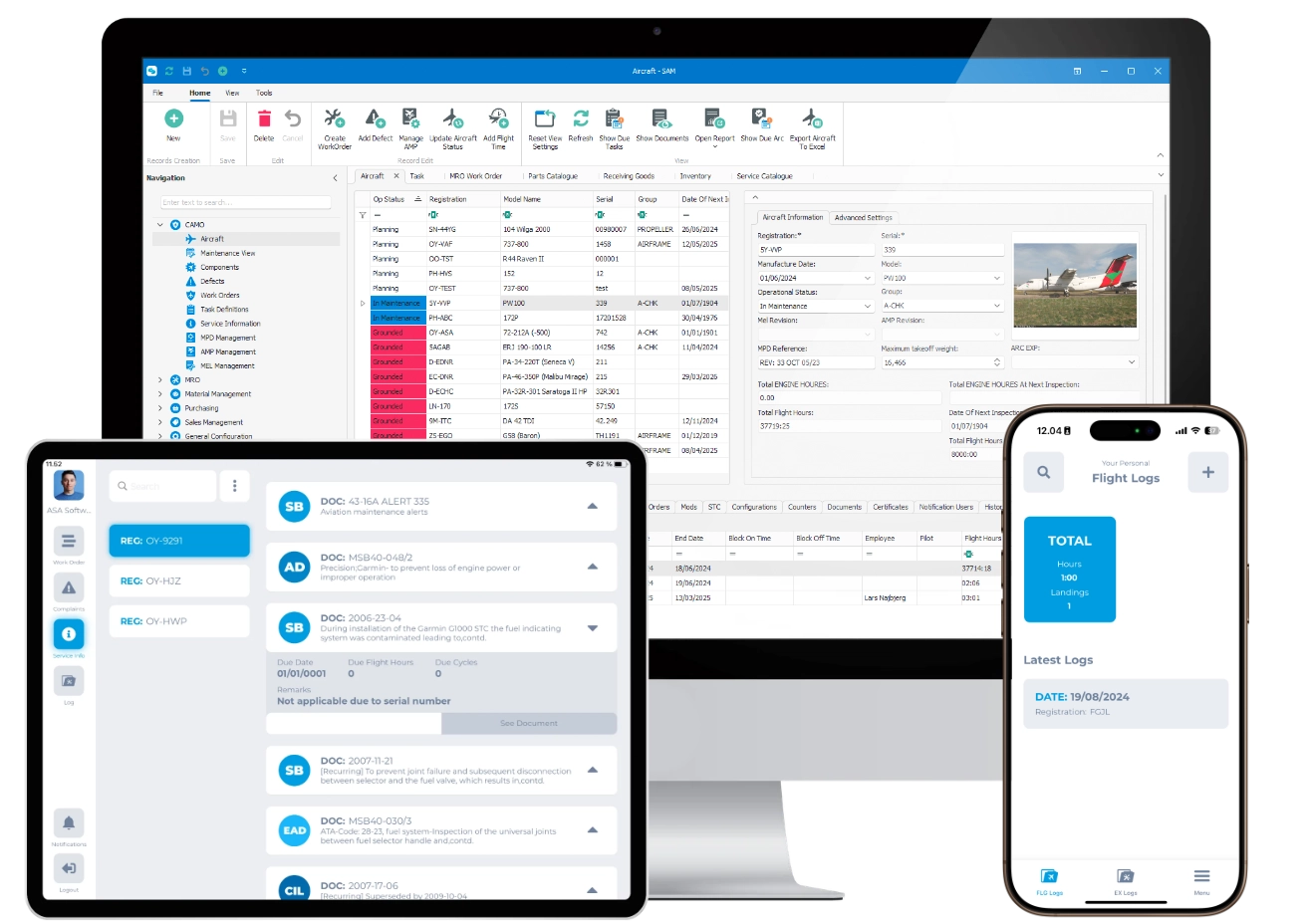
Built for your operation type

Simple, controlled maintenance for private and growing fleets.

Mission-driven planning with component life control and traceability.

Structured programs for airline scale and high-utilization schedules.

Secure deployment and readiness support for sensitive operations.
Platform overview
SAM combines continuing airworthiness, maintenance execution, and supply chain control in one shared data model. That means less manual coordination, faster decisions, and cleaner audit readiness across your whole operation.
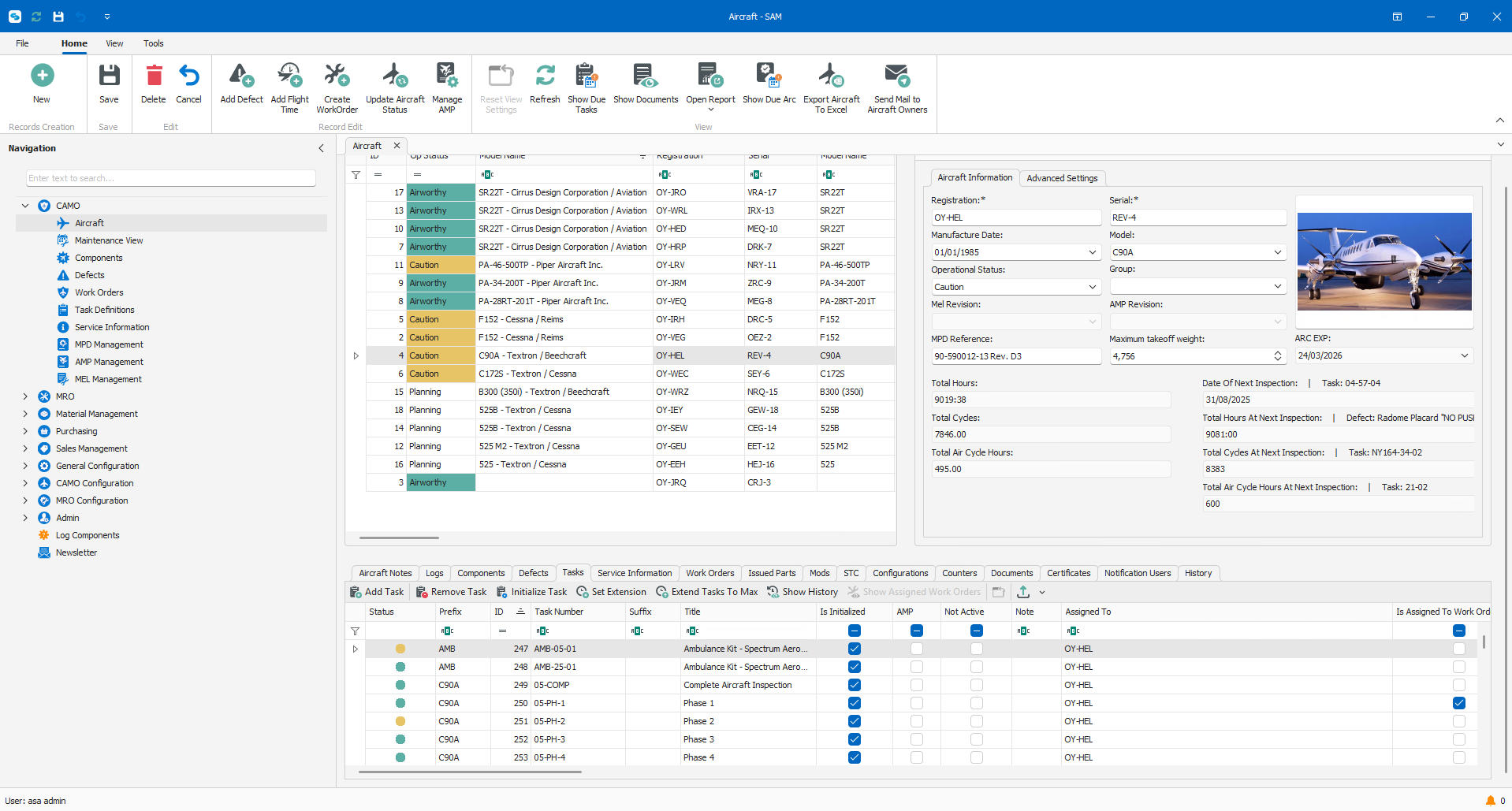 Airworthiness
Control CAMO and CAO planning, aircraft configuration, records, and compliance from one system of truth.
Airworthiness overview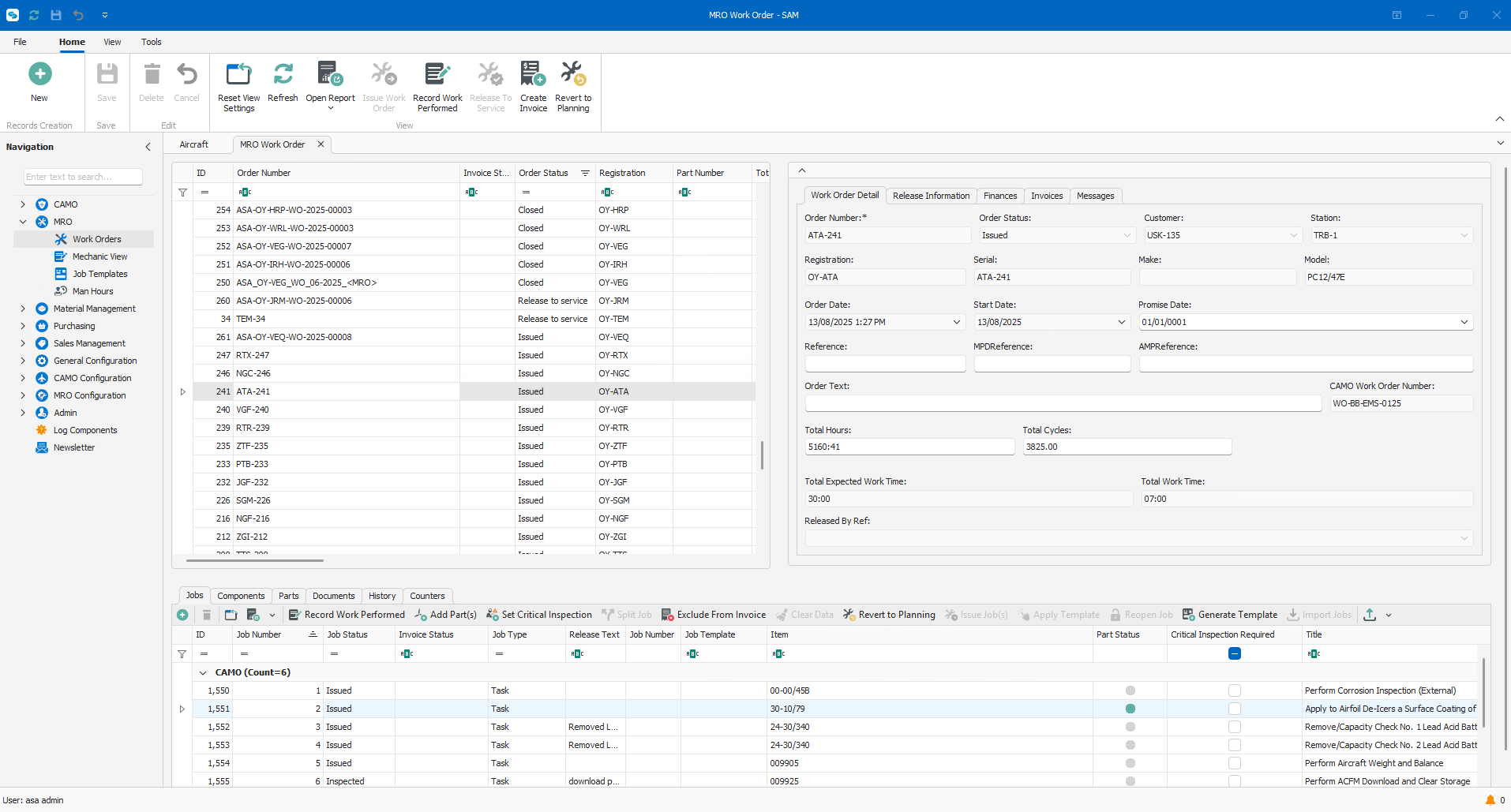 Maintenance
Run Part 145 and CAO execution with digital work orders, labor control, tooling, and complete sign-off flow.
Maintenance overview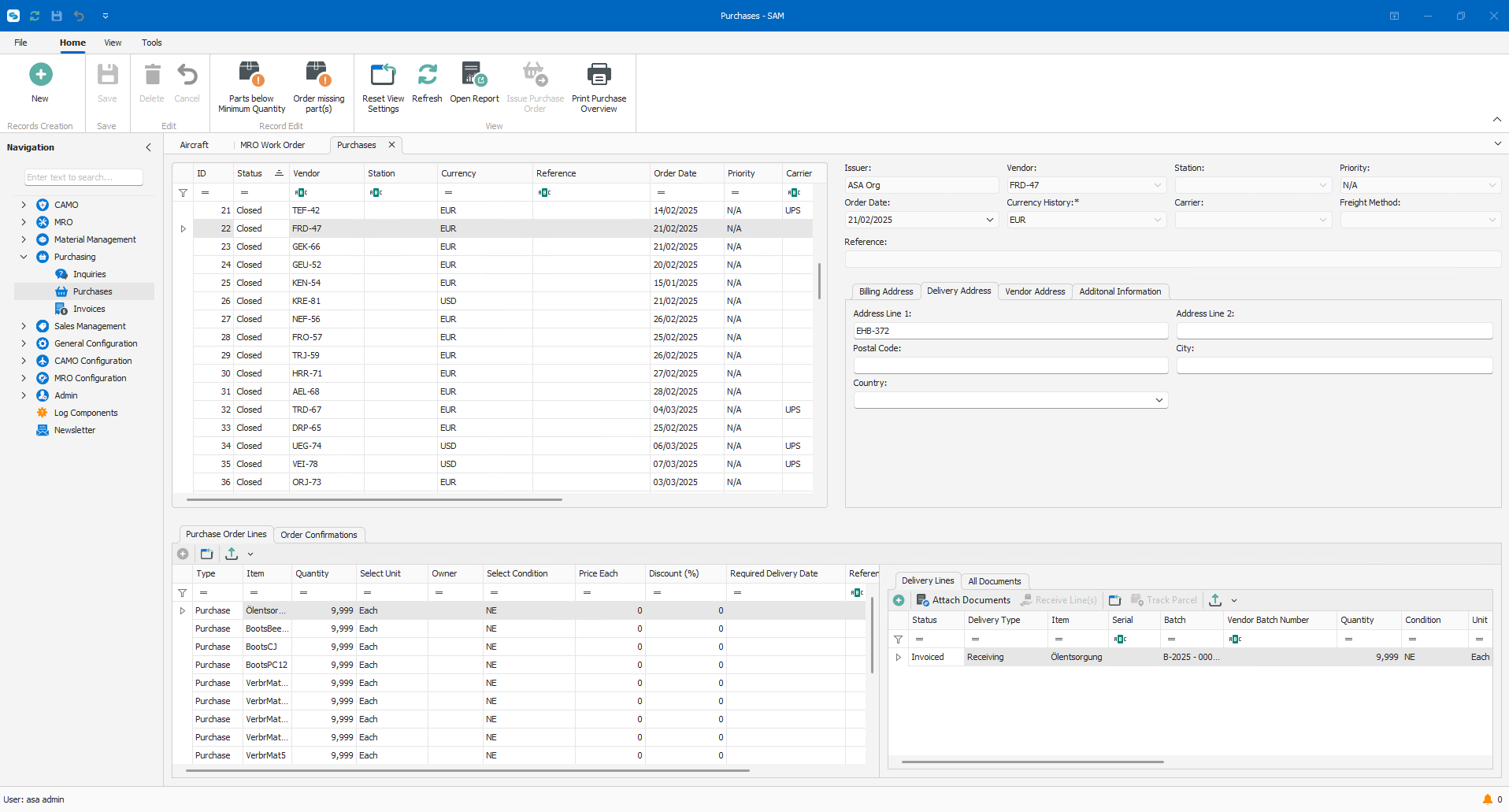 Supply Chain
Keep procurement, inventory, and invoicing directly tied to maintenance demands and aircraft availability.
Supply chain overviewWant a structured walkthrough of modules, data flows, and how SAM applies to your segment?
Schedule a consultationManage aircraft operational status linked to maintenance activity.
Enter flight and journey log data for aircraft and maintenance tracking.
Track installed components, positions, and aircraft configuration changes.
View real-time status of aircraft components, including remaining life and due dates.
Manage serialized components with full life, usage, and installation history.
Track remaining life for LLPs by hours, cycles, or calendar.
Record removals, installations, and reasons for change.
Track aircraft modifications, configurations and ATC applicability.
Manage approved maintenance programs and task intervals for each aircraft and its components.
Maintain and control the approved Aircraft Maintenance Program.
Plan upcoming maintenance based on intervals, flight hours, cycles, or calendar limits.
Import tasks or define new ones for maintenance planning and execution.
Apply the same task across multiple aircraft or components.
View, update, and control CAMO work orders from creation to close.
Track deferred defects, MEL/CDL items, and their expiry limits.
Create and manage MEL items, deferrals, and expiry limits per aircraft.
Record, track, and manage reported defects and corrective actions.
Enforce second sign-off requirements for defined tasks.
Manage service letters, service bulletins, and related technical information.
Track Airworthiness Directives and Service Bulletins and their compliance status.
Define and manage AD/SB applicability across aircraft and components.
Evaluate and record the impact of new or revised technical publications.
Store and manage technical records, manuals, and compliance documents.
Monitor compliance against EASA, FAA, or authority-specific requirements.
Maintain a full audit trail of changes, approvals, and sign-offs.
Define and track custom counters beyond hours, cycles, and calendar.
Analyze defects, delays, and component data for reliability programs.
Build reports using your own data, filters, and layouts.
Provide controlled access for authorities or customers during audits.
Flight school systems can connect to SAM, helping keep records aligned and compliance up to date.
Create work orders with tasks, parts, tools, documents, and references tied to the job.
Import CAMO work orders directly into SAM, manually or using AI.
View, update, and control work orders from creation to close.
Create, organize, and release work packs for scheduled and unscheduled maintenance.
Build standard task templates and apply them to work orders.
Assign tasks based on employee qualifications and approvals.
Issue parts and tools to work orders or aircraft with full traceability.
Track tools, calibration status, and usage.
Control tool availability, assignment, and return during maintenance.
Track complete toolkits during maintenance.
Track parts and materials from receipt through installation, consumption, or sale.
Carry out maintenance tasks and record what was done, by whom, when, and where.
Enforce second sign-off requirements for defined tasks.
Allow multiple technicians to work on and log the same task.
Perform maintenance tasks from tablets or mobile devices, including digital signatures.
Record job card data directly against tasks and work orders.
Document findings discovered during maintenance and link them to the work.
Attach documents or photos directly to work orders or tasks.
Register labor time per task, person, or work order.
View active work orders and see current work-in-progress status.
Compare planned costs against actual labor and material usage.
Issue and record release to service directly from SAM.
Create and manage Form 1s based on your own formats and requirements.
Maintain a full usage and maintenance history for parts, tools, and components.
Store and link certificates, manuals, and documents to parts and tools.
Track employee certifications, validity dates, and compliance status.
Maintain an overview of employee skills and task qualifications.
Build reports using your own data, filters, and layouts.
Provide controlled access for authorities or customers during audits.
Forecast future part demand based on maintenance plans and usage.
Define minimum stock levels and get visibility when inventory drops below set limits.
Create and track supplier inquiries for pricing, availability, and lead times.
Maintain supplier records, approvals, and performance history.
Track supplier lead times to support planning and reordering decisions.
Create, issue, and track purchase orders for parts and services.
Receive parts into stock and record inspection and acceptance results.
Validate and link certifications (Form 1, 8130, etc.) to received parts.
Track batch-controlled parts and materials.
Track expiration dates for consumables and shelf-life controlled items.
Segregate and track unserviceable or quarantined materials.
Manage multiple warehouses, bins, and storage locations.
Maintain full traceability of inventory movements.
Record and approve stock adjustments with audit trail.
Manage approved part alternates.
Reserve and allocate parts for future or active work orders.
Create quotations for part sales, services, and work orders.
Apply customer-specific price agreements or discounts.
Track purchase and sales price changes over time.
Generate invoices for sold parts and services.
Create invoices directly from completed work orders.
Allocate material costs to work orders, aircraft, or customers.
Monitor stock value, cost changes, and inventory valuation.
Build reports using your own data, filters, and layouts.
Provide controlled access for authorities or customers during audits.
Lorem ipsum dolor sit, amet consectetur adipisicing elit. Quidem rerum perferendis enim culpa corporis quisquam obcaecati. Debitis fugit, iusto libero asperiores ipsa, maxime molestiae veniam, culpa numquam ea cupiditate quos?
Lorem ipsum dolor sit, amet consectetur adipisicing elit. Quidem rerum perferendis enim culpa corporis quisquam obcaecati. Debitis fugit, iusto libero asperiores ipsa, maxime molestiae veniam, culpa numquam ea cupiditate quos?
Generate reports for airworthiness tracking or compliance in a matter of seconds.
Lorem ipsum dolor sit, amet consectetur adipisicing elit. Quidem rerum perferendis enim culpa corporis quisquam obcaecati. Debitis fugit, iusto libero asperiores ipsa, maxime molestiae veniam, culpa numquam ea cupiditate quos?
Log every flight digitally, automatically feeding data into inspections, hours tracking, and maintenance planning.
Report defects, associate MELs, track rectification, and maintain a clear history of corrective actions.
in your Pocket
If you already use SAM, add the SAM Aviation App for tablets and Inventory App for phones and Zebra devices as extensions.

A feature-by-feature breakdown of aviation maintenance software options for CAMO and Part-145 MRO organisations.
| Capability | SAM | AMOS | OASES | Ramco | Gannet | WingOps | MRX | Excel | CAMP | TRAX | TRAXXALL | O'weel |
|---|---|---|---|---|---|---|---|---|---|---|---|---|
| Compliance & Regulation | ||||||||||||
| EASA Part-M / CAMO aligned | ||||||||||||
| EASA Part-145 MRO aligned | ||||||||||||
| Airworthiness Directives & Service Bulletins tracking | ||||||||||||
| Pricing & Licensing | ||||||||||||
| Aircraft count doesn't change the price | ||||||||||||
| Pay per concurrent user | ||||||||||||
| Suited to small and mid-sized operators | ||||||||||||
| Deployment | ||||||||||||
| Cloud / SaaS | ||||||||||||
| On-premise deployment | ||||||||||||
| Air-gapped / offline installation | ||||||||||||
| Functionality | ||||||||||||
| Integrated CAMO + MRO in one platform | ||||||||||||
| Helicopter & rotorcraft support | ||||||||||||
| Supply chain & inventory management | ||||||||||||
| Veryon (ATP) technical publications integration | ||||||||||||
| Implementation & Support | ||||||||||||
| Go-live in weeks | ||||||||||||
| Dedicated onboarding & training | ||||||||||||
| Direct access to development team | ||||||||||||
| 24/7 technical support | ||||||||||||
| Multi-authority regulatory support (FAA, TCCA) | ||||||||||||
| Built-in analytics & reporting dashboard | ||||||||||||
This comparison is based on publicly available information from vendor websites, product pages, and published documentation, and may not reflect every feature or recent product change. We have made every effort to represent each platform accurately, but details can change and we may have missed something. If you believe any information here is incorrect or out of date, please let us know and we will correct it. This table should not be the sole basis for a purchasing decision.

See applied to your fleet profile, regulatory context, and daily workflows. Built around your questions, not a fixed script.